Bot Permissions
 Our bot requires certain permissions that are necessary to ensure its functionality.
Invite permissions
Please leave the permissions as they are, because PolliTicket only requests the permissions that are needed.
How do I check the permissions?
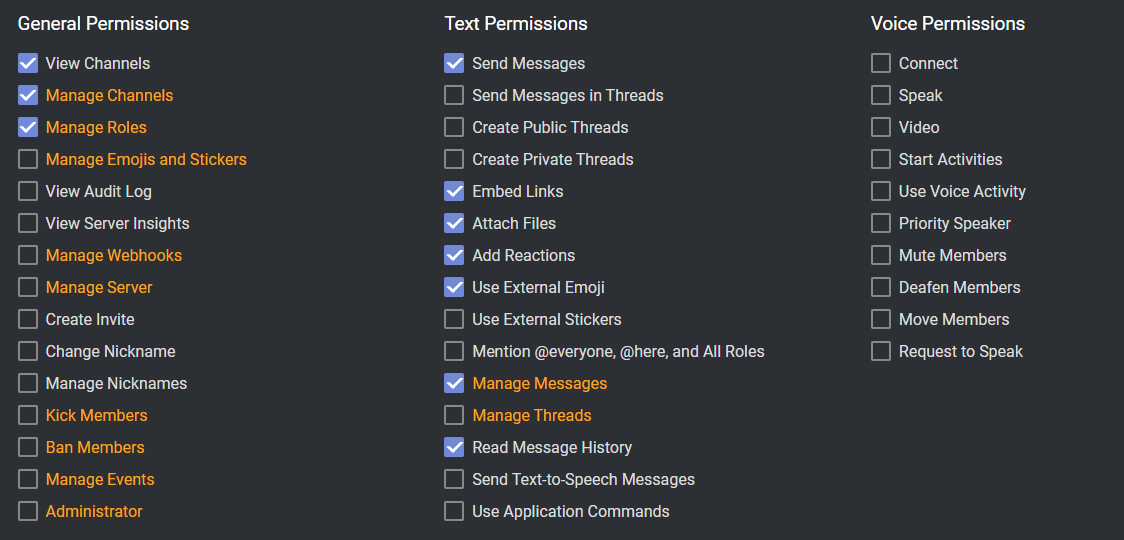
General bot permissions on your Discord
If you have invited the bot with all the required permissions, you will find the role 'PolliTicket' in the settings on your Discord under Roles, there you can check which permissions the bot has.
TextChannel permissions
The first thing to check is whether the bot is listed as a member on the right, otherwise the bot will not see the TextChannel.
 For TextChannel there is a slashcommand, with
 /check-channel-permissions it can be checked if the bot can write/read.